
A search for Reolink mesh router vs TP-Link Deco sounds like a comparison between two whole-home networking systems. That is not what the current product roles show. TP-Link’s Deco family is designed to provide routing, Wi-Fi coverage, and mesh roaming throughout a home. Reolink sells security cameras, NVRs, and Home Hub recorders that connect to a network; its official support documentation says its cameras can work with third-party mesh networks.
The practical answer is therefore not “Reolink or TP-Link.” For many camera installations it is TP-Link for the home network, with Reolink equipment operating on top of that network.
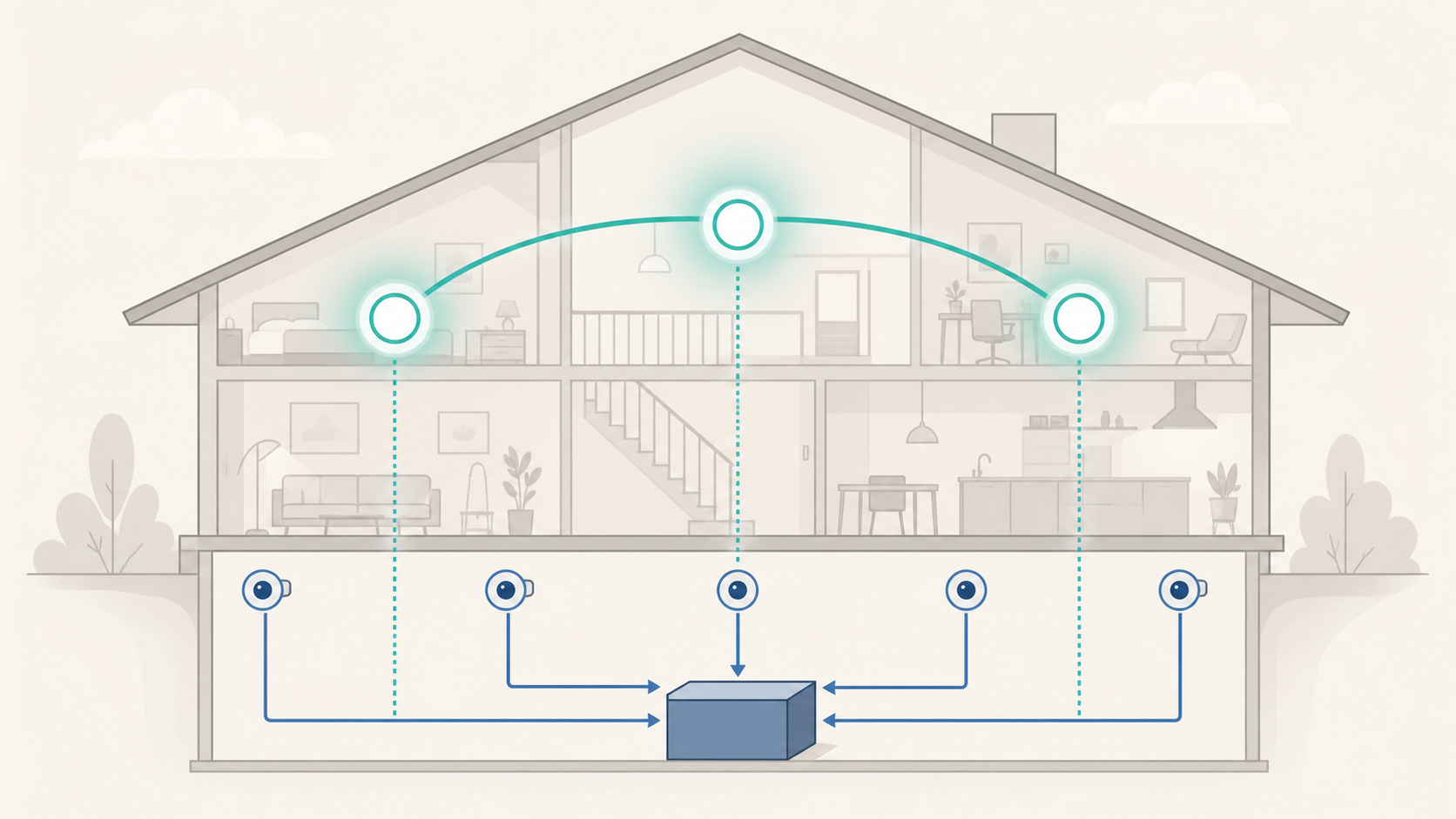
Why This Is a Category Mismatch
TP-Link describes Deco as a whole-home mesh system. Multiple Deco units create one network, select paths between nodes, and move compatible client devices between access points as they travel around the home. TP-Link documents router-mode and access-point-mode Deco layouts, but exact modes, ports, and features must be confirmed for the selected model and hardware version.
Reolink’s Wi-Fi products occupy a different layer. A Reolink camera captures video. An NVR or Home Hub stores and manages recordings. These devices need a network connection, but they are not substitutes for the household router. Reolink’s own compatibility guidance says its non-4G cameras can connect through mesh networks, while warning that results still depend on the network’s settings and complexity.
That distinction prevents the most expensive mistake in this comparison: buying a camera recorder and expecting it to fix weak general-purpose Wi-Fi throughout the house.
Role-by-Role Comparison
| Job in the home | Reolink camera, NVR, or Home Hub | TP-Link Deco mesh |
|---|---|---|
| Connect the home to the modem or gateway | Not its primary role | Yes, in router mode on supported models |
| Extend one Wi-Fi network across rooms | No equivalent whole-home mesh role identified in the reviewed Reolink documentation | Yes |
| Connect Reolink Wi-Fi cameras | Cameras can join a compatible router or mesh network | Supplies the network cameras can join |
| Record camera video locally | Yes, with supported camera storage, NVR, or Home Hub options | No dedicated Reolink recording function |
| Manage camera alerts and playback | Yes, through the Reolink ecosystem | No; Deco manages networking rather than Reolink video |
| Provide wired backhaul between network nodes | Not a whole-home mesh-node function | Available on appropriate Deco installations and models |
The table also explains why the brands are complementary. A stronger mesh does not replace recording storage, and an NVR does not replace careful Wi-Fi coverage.
Why the Reolink “Wi-Fi NVR” Name Causes Confusion
Reolink calls the RLN12W a Wi-Fi 6 NVR because it can create wireless camera connections and record supported cameras. That Wi-Fi capability does not make it a normal whole-home mesh router. Reolink’s RLN12W documentation says the NVR’s internet-facing LAN port must connect to the router by Ethernet and that the NVR does not support a wireless uplink to the router.
The same separation appears in Reolink’s general network instructions: an NVR connects its uplink to a router LAN port, and a Home Hub connects to the router through Ethernet. These products sit behind the router so users can access cameras, recordings, and remote functions.
That can still be useful. Reolink says the RLN12W’s direct wireless camera connections can simplify installation by avoiding network cabling between the NVR and supported cameras. But it does not provide a shared mesh for laptops, phones, televisions, and other household clients.
What TP-Link Deco Contributes to a Reolink Installation
A Deco system addresses the coverage side of the design. TP-Link’s mesh overview describes a unified network with adaptive paths, self-healing behavior, and documented 802.11k/v/r roaming support. Exact radios, Ethernet speeds, number of bands, and security features vary widely across the Deco range, so “TP-Link mesh” is not one fixed specification.
For a Reolink owner, the useful outcome is simpler: place network nodes so each Wi-Fi camera has a reliable connection, while the same network serves the rest of the home. If the ISP gateway must remain the router, select a Deco model and layout that officially support the required access point arrangement; if Deco becomes the router, the modem or gateway arrangement must support that design. Confirm operating modes and port speeds on the exact model and hardware version before buying.
Gearxis has not benchmarked a specific Reolink-and-Deco pairing. Mesh coverage claims cannot predict a stable camera link through a particular exterior wall, foil insulation, brick surface, or detached garage. TP-Link says enclosed placement can reduce signal, while its Deco Ethernet-backhaul guide describes wired links as more stable than wireless hops. Physical layout and backhaul therefore deserve more attention than a large theoretical Wi-Fi speed printed on the box.
A Better Combined Network Layout
For most homes, use this decision rule:
- Connect the modem or ISP gateway to the primary Deco, or run Deco in access point mode when another router must remain in control.
- Place additional Deco nodes in open locations, verify their connections in the Deco app, and use supported Ethernet backhaul where cabling is practical.
- Connect supported Reolink Wi-Fi cameras to the household network, or use the dedicated wireless camera connection offered by a compatible Reolink NVR when that architecture better fits the installation.
- Connect a Reolink NVR or Home Hub to the router or network switch by Ethernet as Reolink instructs.
- Verify live view, recording, notifications, and remote access at every camera before permanently mounting it.
This layout gives each product one clear responsibility. Deco carries network traffic; Reolink equipment captures and manages video.
2.4GHz or 5GHz for Outdoor Cameras?
Mesh branding does not remove radio-frequency trade-offs. In Reolink’s band-preference guidance, the company recommends 5GHz for shorter paths without major obstacles and 2.4GHz for longer paths or links that pass through solid barriers. These are starting points, not a guarantee.
For an exterior camera, a stable lower-frequency link may be more valuable than a faster 5GHz connection that weakens through the wall. For an indoor high-resolution camera near a mesh node, 5GHz may reduce congestion. Supported bands and manual band preference depend on the exact Reolink model and hardware version, so confirm the camera specifications rather than assuming every model supports the same controls.
If a camera repeatedly disconnects, test it near the primary router or a known-good access point before blaming the camera. Reolink itself recommends this isolation step when mesh settings or network complexity may be involved.
Which One Should You Buy?
Choose TP-Link Deco when the problem is weak household Wi-Fi, dead zones, an overloaded ISP router, or the need for a managed multi-node network. Select the exact Deco generation according to the internet plan, wired port requirements, client devices, backhaul options, and number of nodes—not merely the largest advertised combined speed.
Choose Reolink cameras plus an NVR or Home Hub when the problem is video coverage, local recording, event alerts, or centralized camera playback. Do not buy that equipment expecting it to replace the main router or provide a general whole-home mesh network.
Choose both when you need dependable network coverage and a Reolink security system. The mesh is infrastructure; the cameras and recorder are applications using that infrastructure. Build the Wi-Fi foundation first, then add the recording architecture that matches the number and type of cameras—do not treat a Wi-Fi NVR as a whole-home router simply because both names contain “Wi-Fi.”